Draw the pipeline.Read the rows.Catch the drift.
DataFloem is one workspace for visual pipelines and code. Connect your sources, shape the data on a canvas, check real rows at any node, and see exactly which step needs a review when a column changes upstream.
Chosen by data teams in banking, insurance, retail and aviation.









Start where your data already lives.
An administrator registers each connection once. Projects get access to the sources and targets they need, and the canvas colors every node by its family, so a pipeline reads at a glance.
RDBMS
PostgreSQLOracleSQL ServerAzure SQLAzure SynapseMySQLTeradataVerticaClickHouseTrino
Cloud Database
BigQuery
Cloud Storage
Azure Data Lake Storage Gen2Azure Blob StorageGoogle Cloud Storage
Object Storage
Amazon S3S3-compatible stores
NoSQL
MongoDBElasticsearch
Catalog
Iceberg REST catalogsJDBC catalogsFile catalogs
Python Script
Any system you can reach from Python
- FormatsCSV, Parquet, ORC, JSON with Snappy or Gzip
- ReadsFull or incremental, with your own increment script
- WritesAppend or overwrite, with pre and post queries
- ConnectionsSSL/TLS and driver options, secrets kept masked
A canvas with the nodes you actually use.
Right-click the canvas and add a node. Each one opens a typed form, so a join knows its keys and their types, and an aggregation knows which columns it groups and which it computes.
- Versions. Every job keeps numbered versions, so you can change a pipeline without losing the one that runs.
- Copy, paste, group and notes. Organize a large job the way you would a large file.
- Flow parameters. Static or expression values, used in any field as $$name.
- Auto layout and undo. One click tidies the graph. Fifty steps of undo keep you safe.
- Source and TargetAny connector family, read and write.
- SelectKeep, rename or drop columns.
- ExpressionComputed columns in Spark syntax.
- FilterNested rules and condition groups.
- JoinLeft, right, full outer and cross, with typed rules.
- AggregationSum, avg, min, max, count, distinct count, std dev.
- UnionUnion or Union All, mismatches shown per column.
- DistinctOn all columns or the ones you pick.
- SortAscending or descending keys.
- RepartitionPartition count and partition columns.
- SamplingRandom or stratified, with both outputs kept.
- SQLWrite the step as a query, declare the output.
- WranglerCleanup steps with a live draft run.
- PythonA script step with one or more output tables.
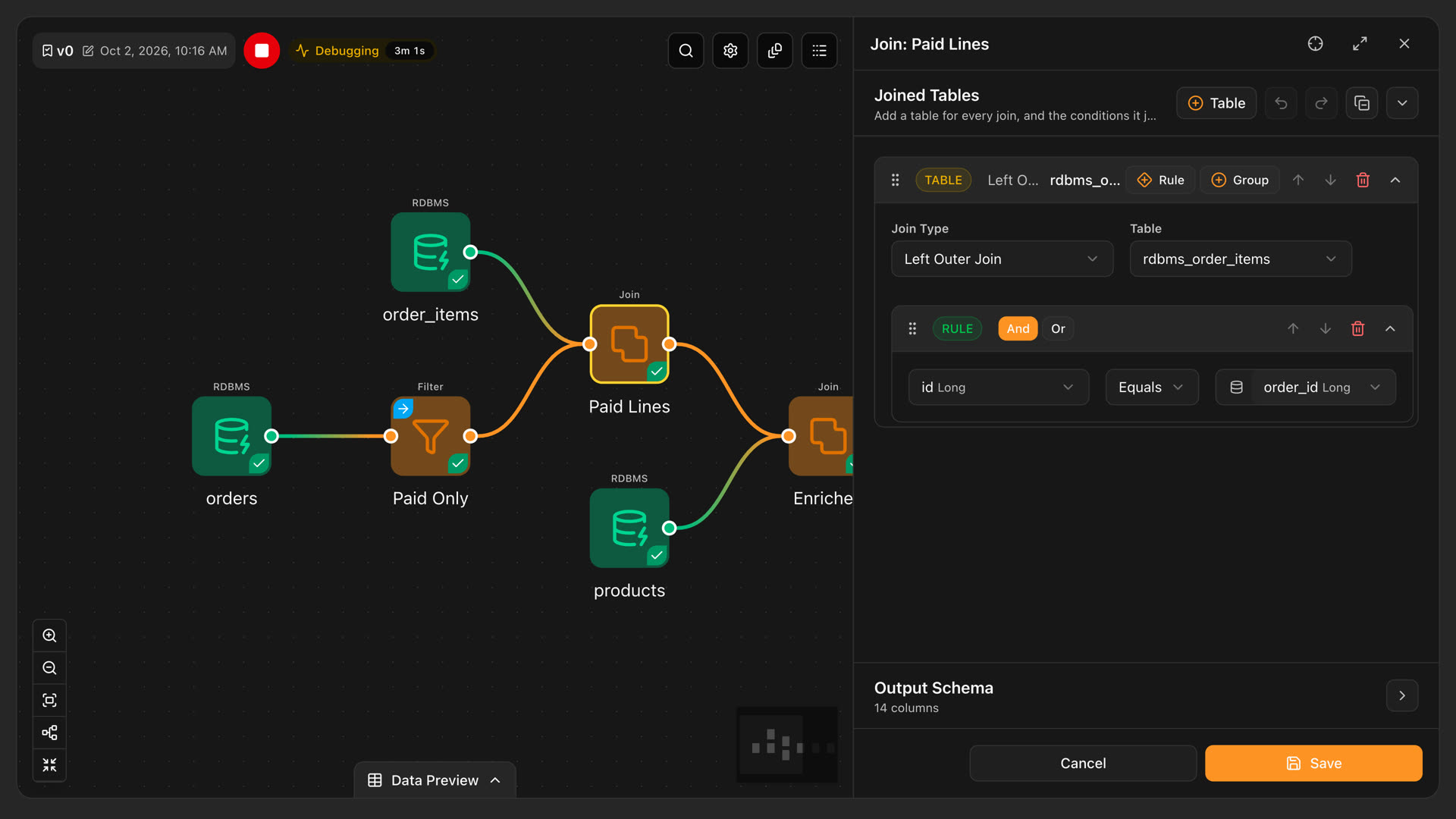
Joins you can read.
Add a table, choose the join type, and build the condition from rules and groups. Each column shows its type next to its name, so a key mismatch is visible before it reaches the engine. The output schema sits at the bottom of the panel with its column count.
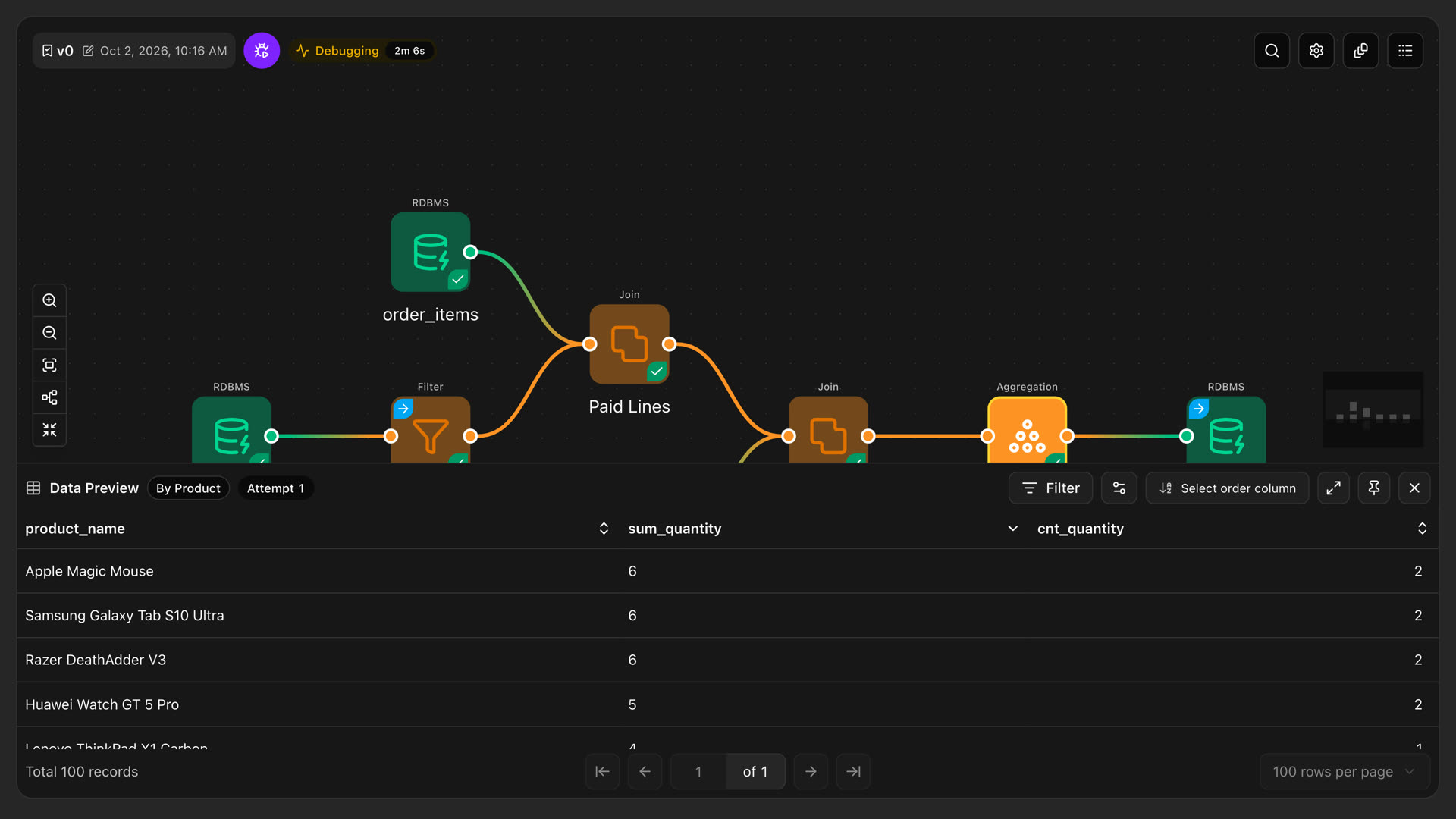
Check the rows at any node.
Run the pipeline up to the node you are working on and open its rows in place. Filter, sort and page through the result without leaving the canvas.
- Partial runs. Select the nodes you care about and run only them.
- Attempts. Each debug attempt keeps its own preview, so you can compare before and after.
- Status on the node. Running, finished and failed states show on the canvas. A node whose settings, wiring or upstream changed since its last run is marked stale.
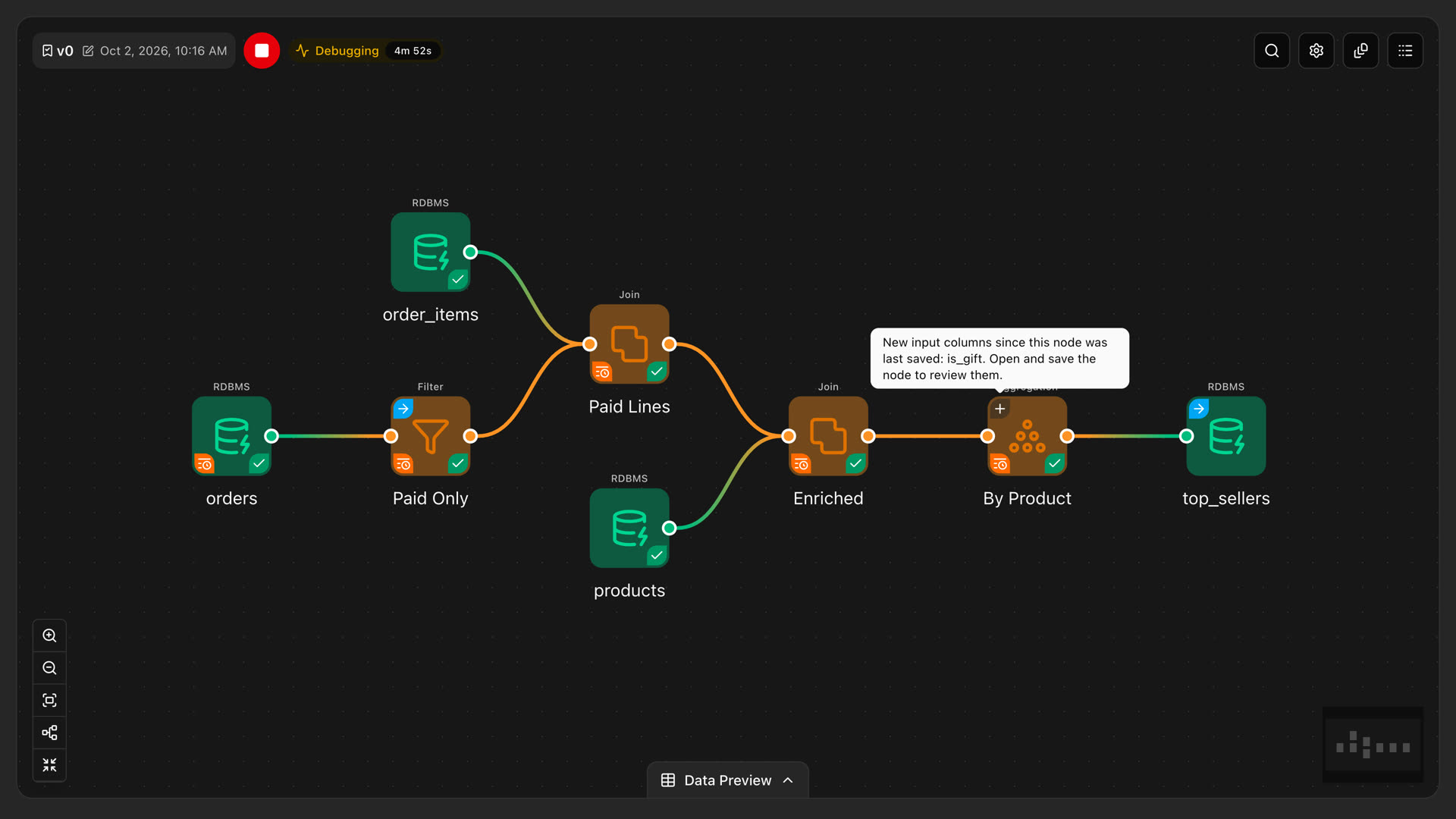
When a column changes upstream, the right node asks for a review.
Every node remembers the columns it was saved with. When a source gains, loses or retypes a column, DataFloem follows it down the edges and marks only the nodes it reaches. You decide what the change means. The canvas does the bookkeeping.
A source moves.
A new column such as is_gift Boolean appears in orders. Nothing runs yet.
The canvas follows it.
Column ids that only moved are repaired for you. Nodes whose meaning could change get a marker, with the exact column names in the tooltip.
A person signs off.
Open the node and choose: adopt the new columns into its output, or keep them excluded. A full run warns you while reviews are still open.
Some work belongs in code. Keep it in the same project.
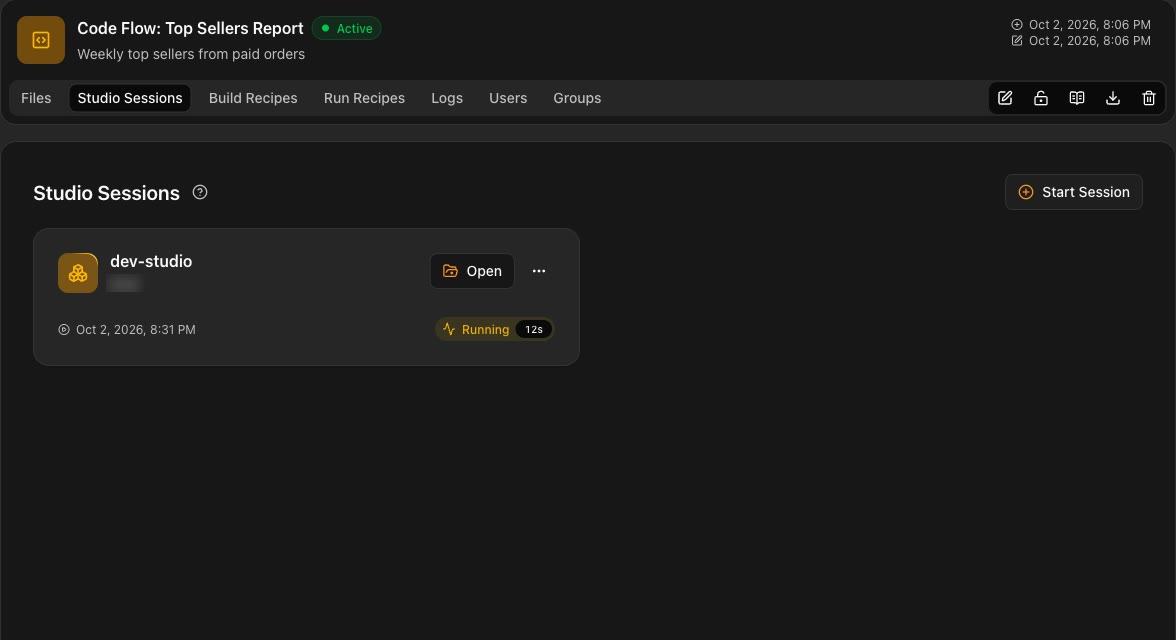
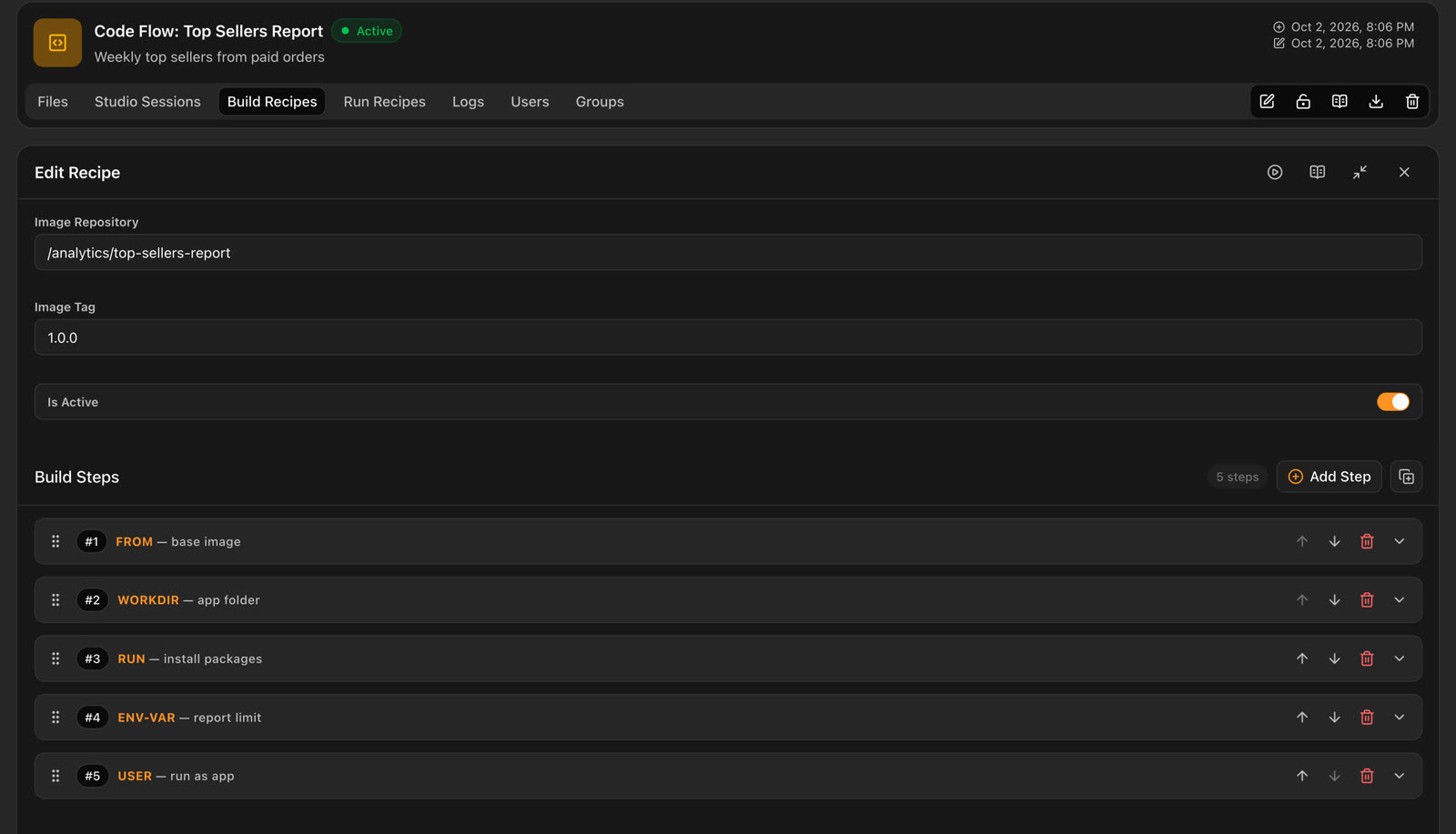
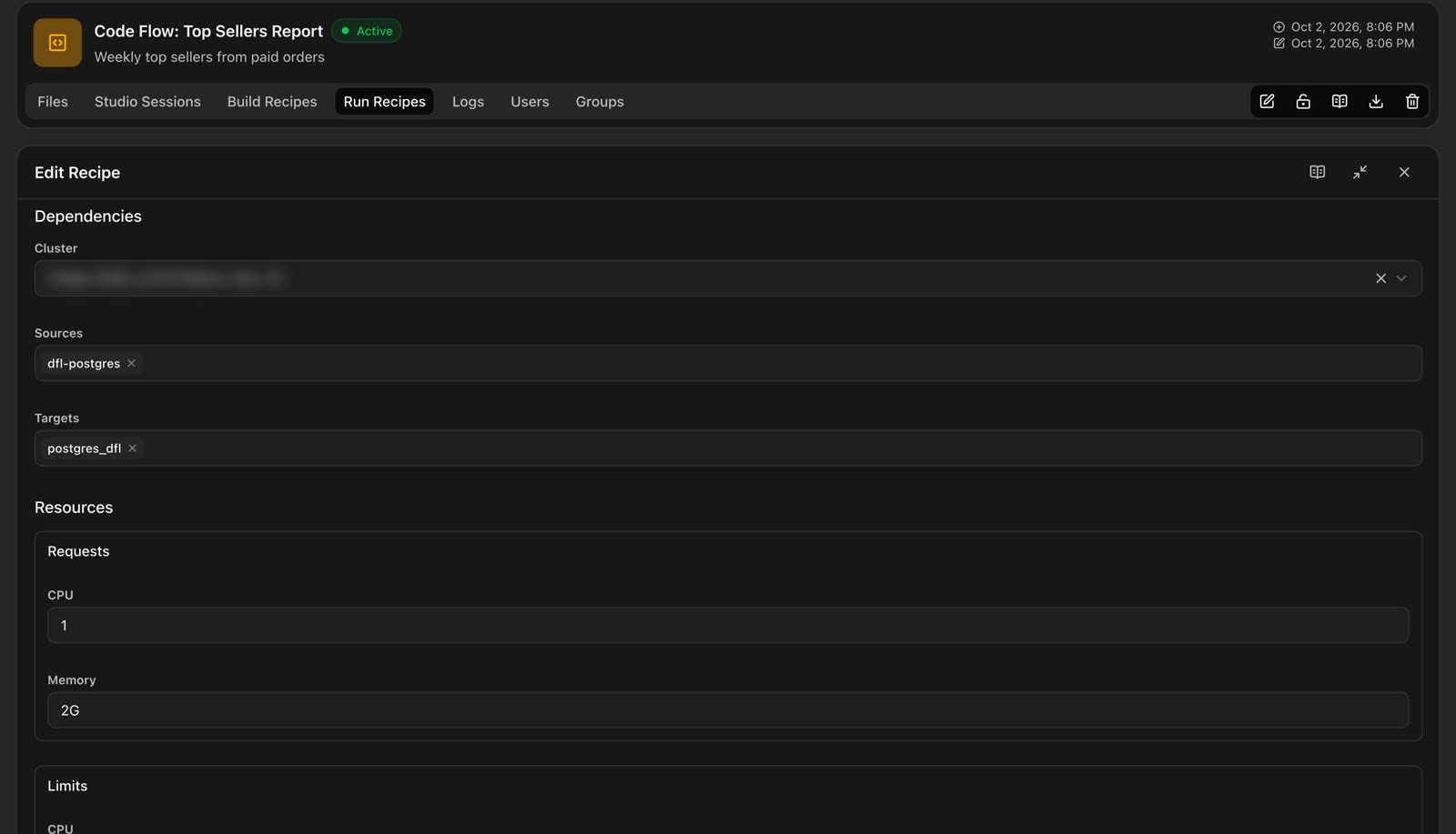
A Code Flow holds the files you write in a Studio session, a Build Recipe that packages them as an image, and a Run Recipe that runs that image on your cluster with the sources and targets it needs.
Write in Studio
Open a Jupyter Lab or VS Code session on a Studio assigned to the project. Save the files you want to keep to the Code Flow.
Package it
Set the image repository and tag, then order the build steps. An agent on your own server builds the image and streams the log back.
Run it on your cluster
Pick the cluster, the project's sources and targets, environment and secret settings, and the CPU and memory requests and limits.
Query the catalogs your pipelines fill.
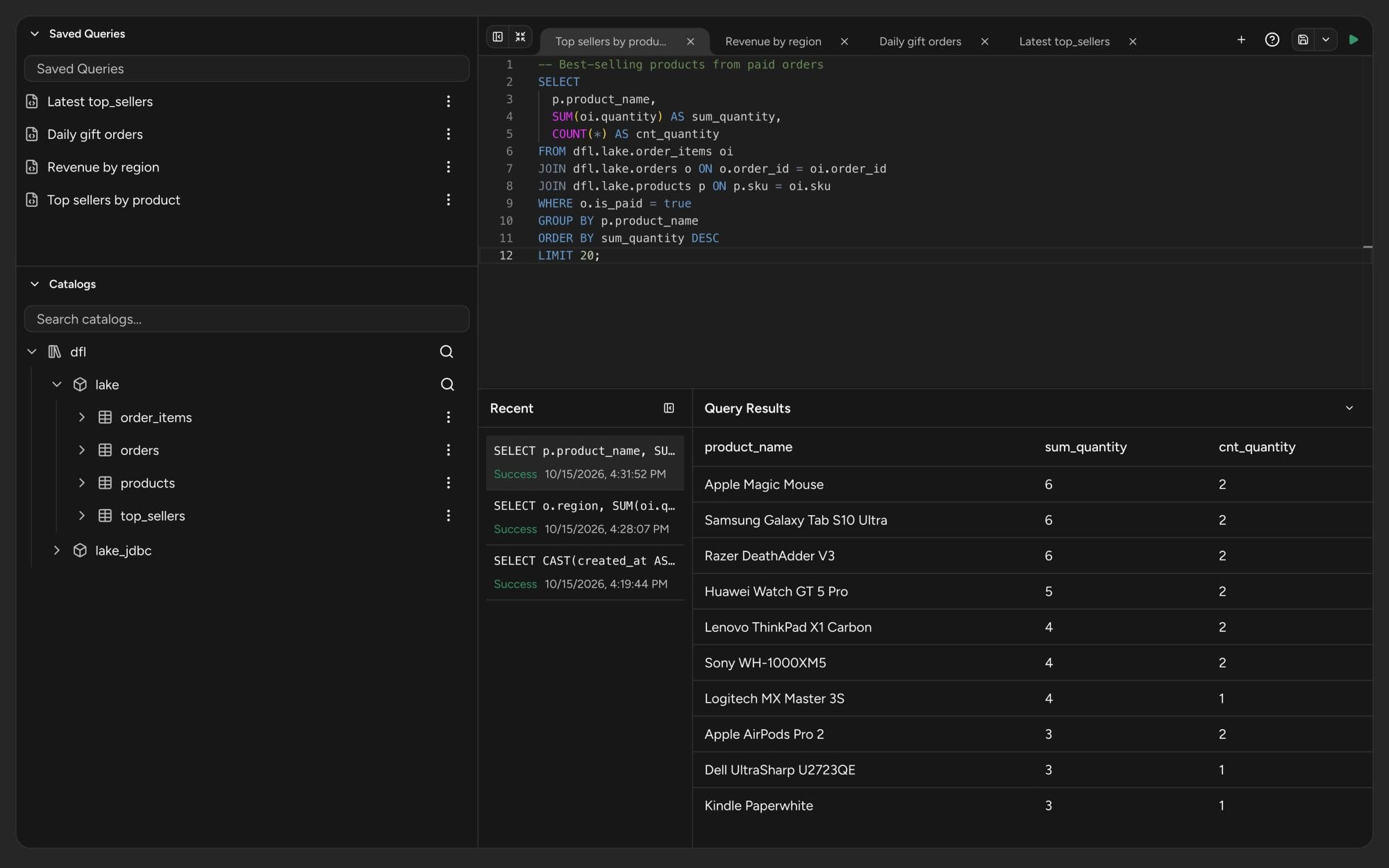
A SQL editor for ad-hoc analysis sits next to your jobs. Browse catalogs, schemas and tables in a tree, open a table in a new tab and run the query on the engine you pick.
- Tabs and saved queries. Work in several tabs at once, save the queries you reuse, and find earlier runs under Recent.
- Results as they arrive. Rows stream into the results panel while the query runs, and you can stop it at any time.
- Catalogs. Iceberg, Parquet, CSV, ORC and JSON tables in JDBC or file namespaces. Create tables from a source in bulk and alter their columns.
- Access down to the table. Policies, roles and bindings decide who can read each table.
Everything around the pipeline, in the same place.
Kubernetes clusters and Studio workspaces with worker counts, idle timeouts, node selectors and tolerations. Configuration profiles keep shared variables and secrets in one place.
Export a job, Code Flow, project, folder or whole namespace to a file and import it into another environment.
Runs in your network. Your data stays there.
DataFloem is self-hosted. You install it in your data center or your own cloud account, next to the systems it reads. Your data and your credentials never leave your network.
- Your computeJobs, partial runs and Studio sessions run on Kubernetes clusters you own, with the CPU and memory limits you set.
- Your build chainA build agent on your servers packages Code Flows and pushes the images to your registry.
- Your connectionsConnections use SSL/TLS. Passwords and secret driver options stay masked in the product.
Built for teams that answer to someone.
Access follows the structure of your organization. Every job, Code Flow and connection lives in a project, and every project has its own users and groups.
A clear hierarchy
Namespaces hold folders, folders hold projects, and projects hold the work. Infrastructure is assigned to a project, or a person asks for it and an owner approves the request as a task.
namespace analytics
└ folder commerce
  └ project revenue
    ├ jobs · code flows
    ├ sources · targets
    ├ clusters · studios
    └ users · groups
Access on every resource
Each job, Code Flow, connection and cluster has its own users and groups, with separate rights to list, read, change, run, use, delete and share.
Sign in with your directory or your identity provider.
A record of who did what
Request and change audit logs, with retention you set and tracking you turn on per resource type.
Open jobs show who else is on the canvas. The first edit takes a lock, others see the job read-only, and an administrator can release a lock that was left behind.
Questions data engineers ask us.
Can't find yours? Write to info@datafloem.com and we will answer.
Where does my data go?
Nowhere outside your network. DataFloem is self-hosted: you install it in your data center or your own cloud account. Jobs read from and write to your systems directly, and your data and credentials stay inside your network.
What runs my jobs?
The Kubernetes clusters you register in DataFloem. Each run goes to the cluster you choose, with the resources that cluster allows. Expressions are written in Spark syntax.
Can I write code instead of drawing nodes?
Yes, at two levels. Inside a job, the SQL and Python nodes let you write one step as code and declare its output. For a whole pipeline in code, a Code Flow holds files from a Jupyter Lab or VS Code session, a Build Recipe that packages them, and a Run Recipe that runs them on your cluster.
What happens when a source table changes?
DataFloem compares the columns each node was saved with against its input now. Column ids that only moved are repaired. Nodes whose output could change get a review marker that names the columns, and a person decides to adopt or exclude them. A full run warns you while reviews are open.
Can I check the results before I run the whole job?
Yes. Select the nodes you care about and run only them, then open the rows of any node in the Data Preview: filter, sort and page through them. Nodes whose settings, wiring or upstream changed since their last run are marked stale.
How do I move work from development to production?
Export a job, a Code Flow, a project, a folder or a whole namespace to a file, and import it into the other environment. Flow parameters keep values that differ between environments out of the job itself.
How do several engineers work on the same job?
Everyone on an open job sees who else is there. The first edit takes a lock and the others see the job read-only until it is released; an administrator can release a lock that was left behind. Every job keeps numbered versions.
How do people sign in, and who can see what?
People sign in with LDAP or your identity provider: Okta, Microsoft, Google or Keycloak. Every resource has its own users and groups, with separate rights to list, read, change, run, use, delete and share. Catalog policies go down to a single table.
How is DataFloem licensed?
The Community Edition is free: register with your email from the setup screen. The Enterprise Edition uses a license that sets the features and limits for your organization, and administrators upload, renew and revoke it in the product.
Start free. Grow into Enterprise.
Both editions are self-hosted. Start with the Community Edition, then move to Enterprise when the team and the controls grow.
Free to start
Register with your email from the setup screen and start building jobs and Code Flows on your own installation.
Get Community EditionSized to your organization
Your license sets the features and limits: users, namespaces, clusters, CPU and memory, retention. Administrators upload, renew and revoke it in the product.
- LDAP and single sign-on
- Request and change audit logs
- Build agents on your own servers
- Catalog access policies
Give your pipelines a shape.
See DataFloem on your own sources. We will walk through a job, a drift review and a Code Flow with your team.